What WooCommerce Subscriptions 9.0 Means for Mix and Match
TL;DR: WooCommerce Subscriptions 9.0 builds All Products for Subscriptions into core, so a Mix and Match subscription box now runs on two plugins instead of three: Mix and Match plus WooCommerce Subscriptions, with no separate All Products extension to buy. Existing subscription boxes keep working after the update. The one visible change is the container’s Subscriptions tab, which now uses a Purchase options dropdown instead of the old Add Plan button.
You run subscription boxes with Mix and Match, you’ve seen that WooCommerce Subscriptions 9.0 is out, and you want to know what it changes for your build-your-own products. The short version is good news: you need one fewer extension, your existing boxes are unaffected, and the only thing that looks different is the setup screen. Here is what changed.
The headline: one fewer extension for subscription boxes
A Mix and Match subscription box, a build-your-own six-pack, snack box, or starter kit that ships on a schedule, has always needed three pieces working together: Mix and Match to build the container, WooCommerce Subscriptions for the recurring billing, and All Products for WooCommerce Subscriptions to put a subscribe-and-save option on the container itself.
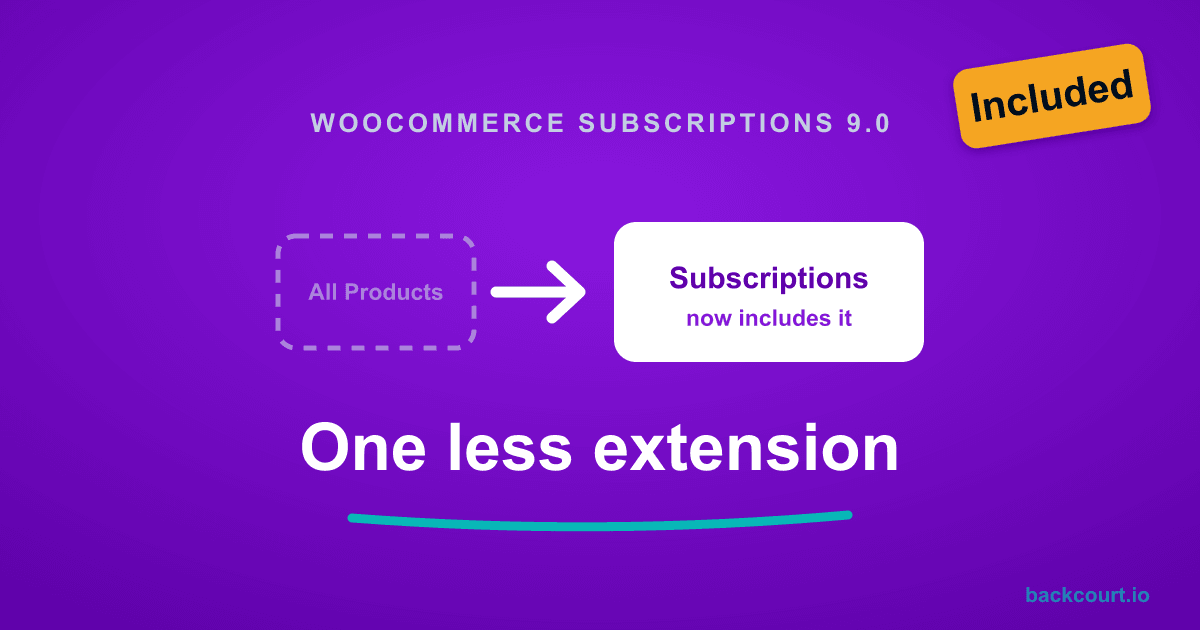
WooCommerce Subscriptions 9.0.0, released June 23, 2026, folds All Products for Subscriptions into the core Subscriptions plugin at no extra cost. The standalone extension is retired. That capability, the one that lets a customer choose “buy once” or “subscribe and save” on a Mix and Match container, now ships inside WooCommerce Subscriptions.
So the same subscription box now runs on two plugins instead of three: Mix and Match and WooCommerce Subscriptions 9.0. If All Products for Subscriptions was a separate line item on your store, that cost goes away. We covered the merge itself in detail in our explainer on All Products moving into core.
Your existing subscription boxes keep working
Your existing boxes keep selling exactly as they do today. The merge carries the All Products feature into core while keeping the integration points Mix and Match depends on, so your container configurations, subscription plans, and active subscriptions all carry over. WooCommerce Subscriptions 9.0 migrates existing installations automatically.
Once you’re on 9.0, the standalone All Products for WooCommerce Subscriptions plugin is redundant. You can deactivate and remove it without losing your subscription settings, because the core plugin has taken over.
Tip: Update WooCommerce Subscriptions to 9.0 first, confirm one of your subscription boxes still shows the buy-once and subscribe options on the product page, and then deactivate the standalone All Products extension. Keep Mix and Match on its current version so the integration stays in force.
What’s different: the container’s Subscriptions tab looks new
The one change you’ll actually see is in the product editor. Bundled into WooCommerce Subscriptions 9.0, All Products ships a redesigned interface, so the Subscriptions tab on a Mix and Match container no longer uses the old Add Plan button. The setup is the same idea with a new layout.
Open your Mix and Match container and go to the Subscriptions tab in the Product data panel. It now starts with a Purchase options dropdown with three choices:
- Use storewide subscription plans: apply the subscription plans you’ve defined once for the whole store.
- Create custom subscription plans: set plans on this container only.
- Sell one-time only: no subscription option on this product.
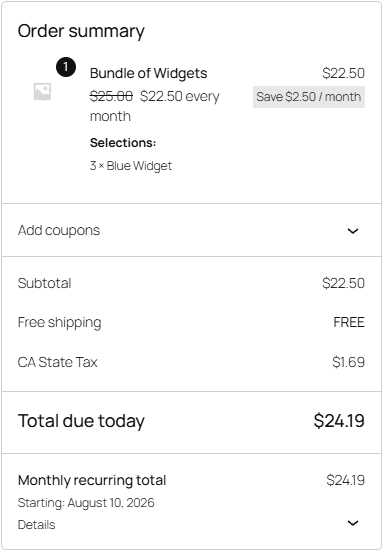
Choose Create custom subscription plans and a Subscription plans for this product table appears with an Add subscription plan button. Each plan you add sets the billing frequency and period, an optional signup fee, free trial, and expiration, and a price rule: Discount the product price by a percentage or Set a custom price. A box priced at $25.00 with a 10% discount plan, for example, sells at $22.50 per month.

To let customers still buy the box as a one-time purchase, tick Customers can buy this product without subscribing under One-time purchases.
Note: This redesigned setup screen comes from All Products being bundled into WooCommerce Subscriptions 9.0, not from Mix and Match. It’s the same tab for every product type All Products supports, so if you also sell subscribe-and-save on simple products, they use the identical Purchase options layout.
On the product page, the customer then chooses between One-time purchase and Subscribe, exactly as before.

At the checkout, a subscribed box bills as a recurring order. The customer pays the discounted price today, and WooCommerce Subscriptions shows a separate monthly recurring total dated to the first renewal.
New to selling a Mix and Match box on a subscription, or want to walk through the full setup? The Mix and Match: Subscriptions documentation covers adding subscription plans to a container step by step, and the main Mix and Match documentation covers building the container and choosing how it ships.
Frequently asked questions
Do I still need All Products for WooCommerce Subscriptions to sell Mix and Match subscription boxes?
No. As of WooCommerce Subscriptions 9.0.0, released June 23, 2026, the All Products capability is built into WooCommerce Subscriptions at no extra cost. A Mix and Match subscription box runs on two plugins: Mix and Match and WooCommerce Subscriptions. The standalone All Products extension is retired.
Will my existing Mix and Match subscription boxes break when I update to 9.0?
No. WooCommerce Subscriptions 9.0 migrates existing installations automatically. Your container configurations, subscription plans, and active subscriptions carry over. Keep Mix and Match on its current version and the integration keeps working.
Where did the Add Plan button go on the Subscriptions tab?
WooCommerce Subscriptions 9.0 ships a redesigned All Products interface. The Subscriptions tab now opens with a Purchase options dropdown. Choose Create custom subscription plans to reveal the plans table and an Add subscription plan button, which replaces the old Add Plan button.
How do I let customers buy a Mix and Match box once instead of subscribing?
On the container’s Subscriptions tab, tick Customers can buy this product without subscribing under One-time purchases. The product page then shows both a One-time purchase and a Subscribe option for the box.
Does this change how customers assemble and check out the box?
No. Customers pick their items, choose one-time or subscribe on the product page, and add the box to the cart the same way as before. A subscription box checks out as a recurring order at the plan’s price.
What’s next?
- Want the full picture of the All Products merge across every product type? Read our explainer on All Products moving into WooCommerce Subscriptions core.
- Setting up a build-your-own subscription box from scratch? See the Mix and Match: Subscriptions documentation.
- Running Name Your Price alongside Subscriptions too? See What WooCommerce Subscriptions 9.0 Means for Name Your Price.
- For the current setup screens after the merge, see the official WooCommerce Subscriptions documentation.
That is the whole change: one fewer extension to license, and a setup screen that does the same job with a new layout. Update WooCommerce Subscriptions to 9.0 and take the standalone All Products extension off your plate.